Quick Summary
- Multi-PSP means using more than one payment provider on your store at the same time.
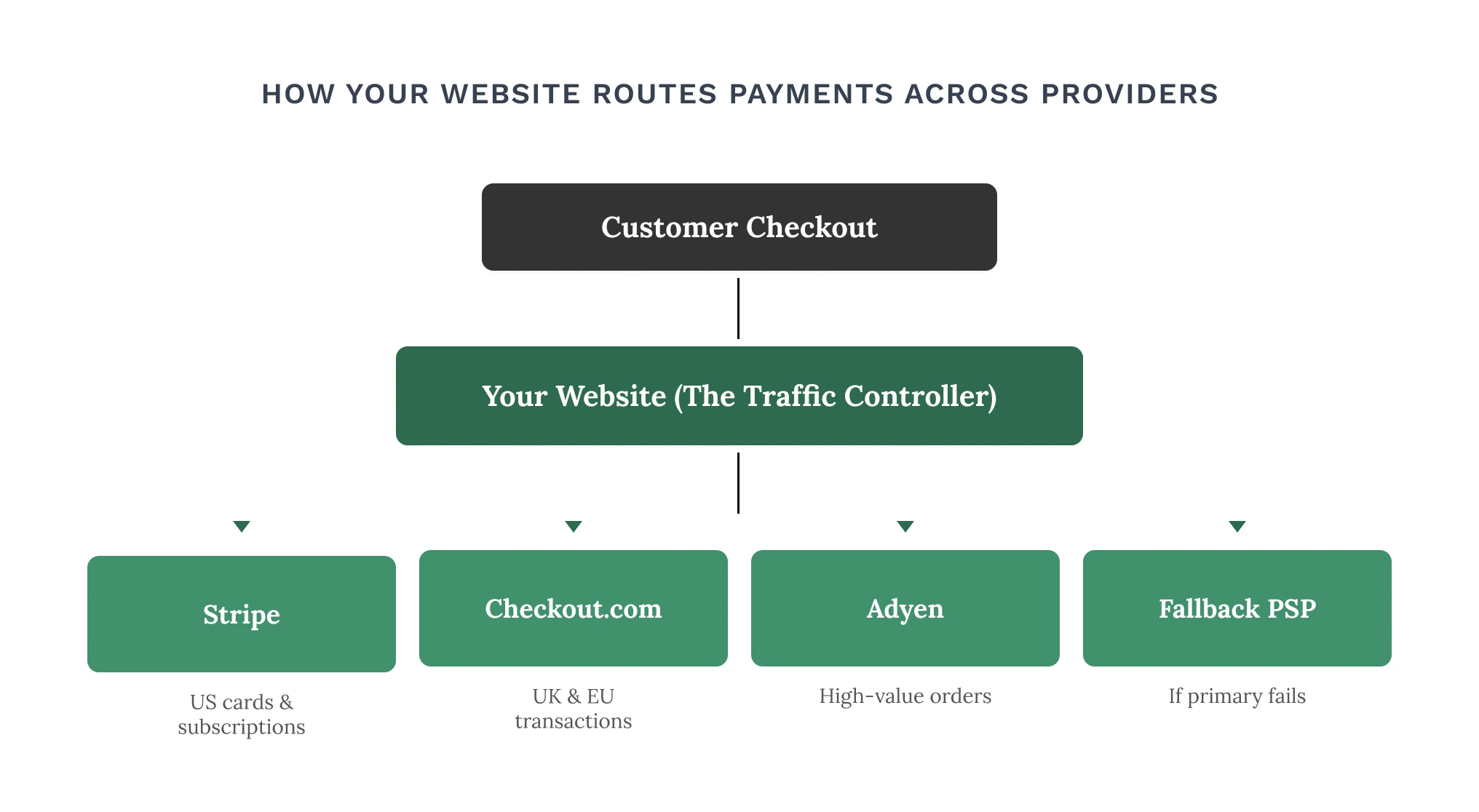
- Your website controls which provider handles each payment, and when to switch automatically.
- Template platforms like Shopify limit how many providers you can use. Custom-built stores don’t.
- A 3% improvement in payment approvals on a $10M store equals $300,000 in recovered revenue.
Most e-commerce store owners treat payments as a one-time setup. Pick a provider, connect it to your platform, and move on. It works, until your payment provider goes down on your busiest day, or your store starts selling internationally and approval rates quietly drop.
That’s where multi-PSP payments come in. And more importantly, where your website determines whether you can actually make it work.
What Is a PSP?
A PSP, Payment Service Provider, is the company that handles card transactions on your online store. When a customer hits “Buy Now,” the PSP checks the card, approves the payment, and moves the money to your account.
Common examples include Stripe, PayPal, Adyen, Checkout.com, and Braintree. Most stores start with one. For smaller stores with steady, local traffic, that’s perfectly fine. The problems start when you scale.
How Does a Multi-PSP Setup Prevent Lost Sales?
A multi-PSP setup prevents lost sales through payment failover: when your primary provider declines a transaction or goes down, your website automatically reroutes the payment to a backup provider, so the sale completes without the customer noticing. This automatic rerouting is part of what the payments industry calls payment orchestration.
Multi-PSP for online stores means connecting more than one payment service provider to your website at the same time. Instead of every transaction running through a single gateway, your store routes, splits, or switches payments between providers based on rules you set.
The connection to lost sales is direct. When your only provider goes down, even for 20 minutes during a peak period, every customer who tries to check out hits an error. With failover in place, a second provider catches those transactions automatically. The customer never sees a problem. The sale goes through.
Key Concept
Think of multi-PSP like having a backup till at a busy checkout counter. If one goes down, the other takes over immediately, and the queue keeps moving.
Why Are Growing E-Commerce Stores Using Multiple Payment Providers?
Growing stores add payment providers to solve specific, measurable problems, not as a precaution. Each reason ties to a business outcome:
- Failover when a provider goes down – payments continue through a backup, and the customer notices nothing.
- Higher approval rates by region – routing a French customer through a European acquirer instead of a US-based one can improve authorization rates and reduce fees. [VERIFY: the “5–15%” figure, source it or mark as illustrative/in-our-experience.] This is recovered revenue with no extra ad spend.
- Least-cost routing on large orders – sending high-value transactions through the lowest-fee provider saves real money at scale.
- Support for local payment methods – different markets prefer different ways to pay.
- No single point of failure – you’re not exposed to one provider’s outages, pricing changes, or policy shifts.
What Does Smart Payment Routing Look Like?
Smart routing is what separates a proper multi-PSP setup from simply having two payment buttons on your checkout page. It means your website automatically decides which provider handles each transaction, based on rules you define. Here are three straightforward examples:
| Rule Type | Trigger | Action |
|---|---|---|
| By Order Value | Order exceeds $5,000 | Route to the provider with the lowest fee to reduce processing costs |
| By Location | UK card detected at checkout | Route through Checkout.com; US cards go through Stripe |
| By Provider Health | Primary provider is slow or unresponsive | Automatically switch to backup provider, customer sees nothing |
None of this is possible on a standard Shopify template or a basic Woo Commerce setup. It requires a website built with payment flexibility as part of the foundation, not bolted on as an afterthought.
What Does Your Website Have to Do With All of This?
This is the part most store owners don’t expect: your website architecture directly affects how your payments perform. Your website is not just a storefront. It is the system that connects your customer to your payment provider, and the way it is built determines what’s possible.
Template Platforms vs Custom Builds
| Capability | Shopify | Woo Commerce | Magento / Adobe Commerce |
|---|---|---|---|
| Multiple payment providers | Limited | Yes (plugins) | Yes (modules) |
| Custom routing rules | No | Partial | Partial |
| Automatic failover | No | Limited | Limited |
| Checkout fully customizable | Restricted | Moderate | Moderate |
| All sales data in one view | No | Partial | Partial |
Signs Your Website Is Limiting Your Payment Options
Not every store needs to restructure its payment setup right now. But these are the signals that your current website may be quietly costing you revenue:
- A payment provider outage caused you to lose sales you couldn’t recover.
- You’re locked into one provider with no easy way to add another.
- You’re selling internationally but can’t support local payment preferences.
- Your checkout experience is slow or restricted and you can’t change it.
- Your team logs into multiple provider dashboards to build one sales picture.
How a Custom E-Commerce Website Changes the Picture
Custom e-commerce development doesn’t mean rebuilding your store just to add a second payment provider. It means building a website where payments are treated as a core part of the architecture from day one, not an add-on you squeeze in later.
With a custom-built store, you get:
- Multiple payment providers built in, no platform restrictions on who you can use.
- Routing rules you control, by order value, customer location, or provider availability.
- Automatic backup, if one provider has issues, another takes over without customer disruption.
- One unified sales dashboard, all payment data in one place, regardless of how many providers you use.
- A checkout built for your brand, not a template you can’t change.
- Room to grow, add new providers as your business expands without rebuilding from scratch.
Beanstalk’s Approach
At Beanstalk, we build custom e-commerce websites where payment infrastructure is a foundational decision, not a plugin. Whether you need a single provider set up properly or a more flexible setup as you scale, we build sites that are ready for where your business is going.
Final Thoughts
Multi-PSP payments aren’t a technical luxury reserved for enterprise retailers. They’re a practical solution to a problem every growing e-commerce store eventually faces, what happens when your single payment provider lets you down.
The key insight is this: your website is the traffic controller. It decides which provider handles each payment, when to switch, and how all that data gets reported back to you. A template platform gives you limited control over that. But, a custom-built store gives you full control.
If payment flexibility matters to your business, whether that’s better approval rates, international expansion, or simply having a backup when things go wrong, it’s worth looking at whether your website is built to support it. Let’s connect.